In ArchiCAD, as in any coordinate system, all measurements are made in reference to an origin. The location of the origin is always interpreted as (0, 0).
ArchiCAD defines three coordinate system origins:
The Project Origin is a constant location which remains fixed for the life of your Project. The Project Origin of the coordinate system, marked with an X, is close to the lower left corner of the Floor Plan window, when using the default view of the default template. (The Coordinates Palette shows the coordinates as (0, 0).
In Floor Plan and other 2D views, the origin is always marked by a bold X.
In 3D Views, the origins and their X, Y and Z axes are displayed with bold black lines.
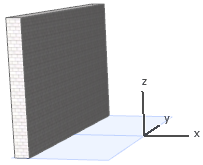
User Origin
The User Origin is the place at which element input begins. By default, the User Origin is located at the Project Origin. However, the User Origin can be moved to any location, allowing you to “reset the zero point” to any location. This is often helpful when you need to draw elements with respect to existing walls, slabs or other components.
For details, see Reposition User Origin.
The Edit Origin is also temporary; it appears only during drafting and editing operations and is used to display the distance and angle of a rubber band line from the starting point of a drawing operation.