Control Element Info for Mobile Users
When you publish an ARCHICAD project in BIMx Hyper-model format, the file’s recipient, viewing the BIMx model on a mobile device, sees the project’s 3D and 2D information - including certain element information.
Until now, the element information provided in the Info feature of BIMx mobile apps consisted of a predefined set of data.
As of ARCHICAD 19, you can control which element information will be published as part of your Hyper-model.
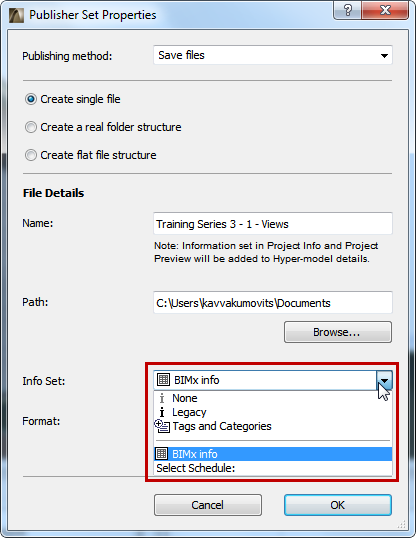
•When publishing the Hyper-model, use the new Info Set pop-up to define the element info that the recipient will see:
•The BIMx info option uses data defined in an Interactive Element Schedule of this name. This schedule is provided in the factory-default ARCHICAD template (for the International market), but you are free to modify the schedule scheme as needed, or to choose a different schedule.
•The Tags and Categories option uses the data defined for each element in the Tags and Categories panel of its Element Settings dialog box.
•The Legacy option provides the same basic element data as in previous BIMx versions.
•Choose None if you don’t want the recipient to view any element information (e.g., if the recipient will just be viewing the model geometry as a whole, and doesn’t need any details on the various component elements).
For more details, see Use the Publisher to Create a BIMx Hyper-Model.