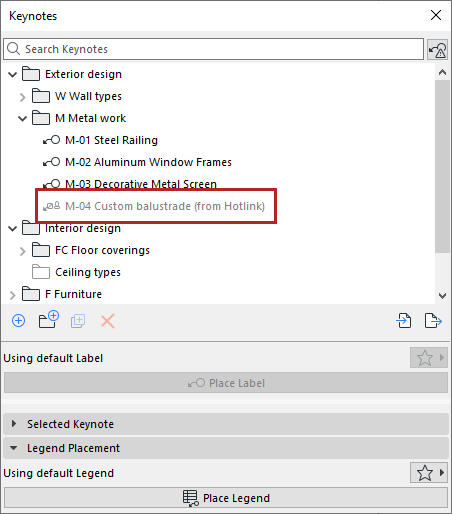
Hotlink modules bring their Keynotes with them, and you can freely place these Keynotes on any element in the project.
Note: A saved module (.mod) file includes only the Keynotes that have been used in labels.
•Hotlink Keynotes which match Keynotes in the host file are not listed in the Keynote palette, because it’s the same data.
•Hotlink Keynotes which differ from those in the host file are marked with a unique icon in the Keynote palette tree.
Hotlink Keynotes can’t be edited in the host file.
Recommendations
•Use the same Keynote database in the host and in all hotlinked modules. (See Import/Export Keynotes)
•Don’t edit Keynotes that are used in both modules and the host. If you do edit them, re-export the result to the other modules or host to make them consistent.
Conflicts
A conflict occurs if a Keynote (as identified by its Key) has different data (e.g. different description) in the module versus the host. Such conflicts are marked: “Conflict in Hotlink” or “Folder conflict”.
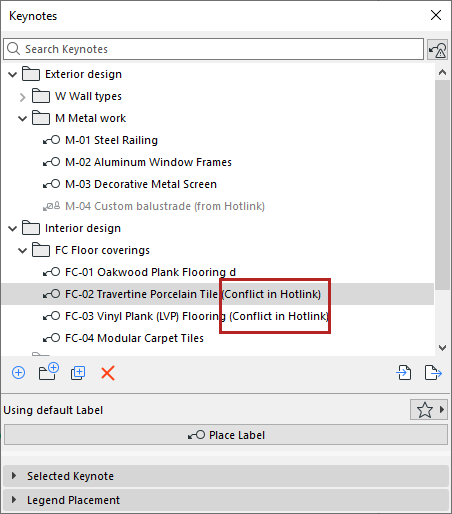
You can still use these Keynotes in labels, but the conflicting data item will be shown as “Missing”.
You can also display these Keynotes in the Legend, with or without the conflicting data item (set this preference in Legend settings. See Filter Legend content.)
Show Keynotes that are different in Hotlinks
Click this button next to the searchbar to list only Keynote items which have differences due to hotlinks.
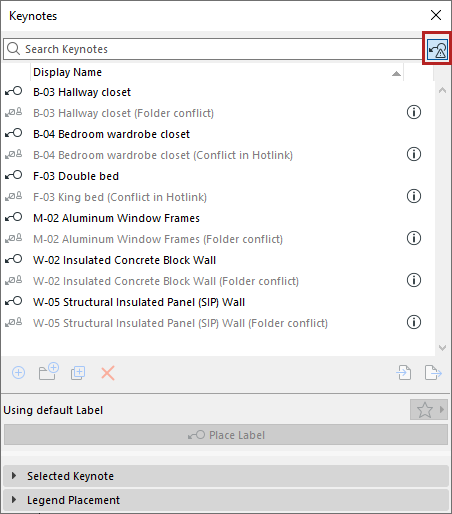
•The black rows are the Keynotes/folders of the host file
•The grey items are the Keynotes/folders from hotlinks
Click the info icons to see more details about the conflict.
In the host project, it isn’t possible to edit Keynotes if they come from a hotlink. To handle the conflict, you can do one of these:
•Open the module file and edit the related data, then update the hotlink in the host
•Edit the Keynotes/folders of the host file to be the same as in the module file