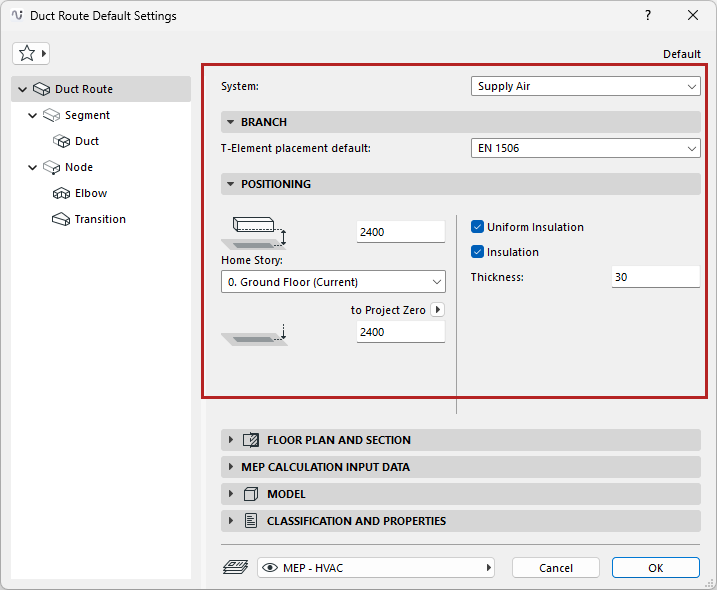
Route Settings - Branch, Positioning, Insulation
Open Route Tool Default Settings.
MEP System
Choose an available MEP System. The MEP System defines the Route’s appearance in 2D and 3D. See MEP Systems.
Note: When you connect a route element to a standalone MEP object, the route element automatically “inherits” the MEP System of the object’s connection point.
Branch
Under Branch, the default dimension table is given for the route’s T-elements.
See Route Specifications.
Positioning
•Set the Route element’s Home story and offset from the Home story
•Set the Route element’s bottom offset from the chosen Reference level
Uniform Insulation
Check to apply the same insulation value to all parts of the route: Duct, Elbow, and Transition.
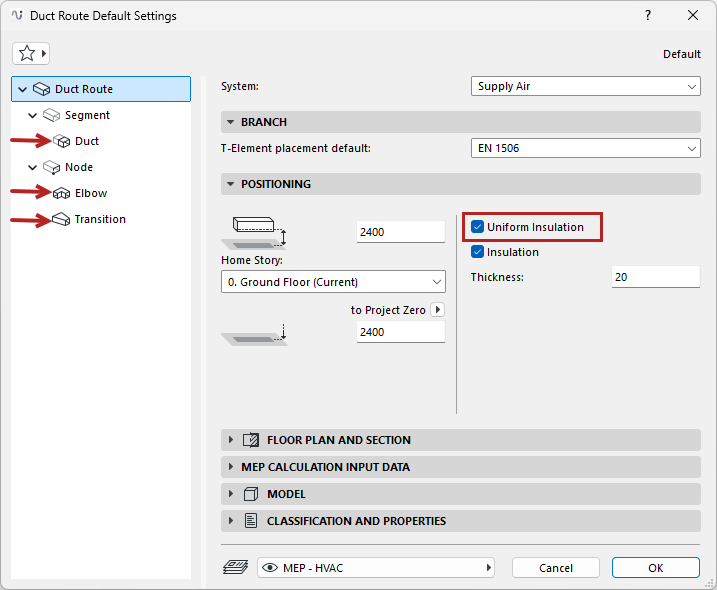
If needed, uncheck the box to set separate insulation values for any part on its own settings page.
Insulation
Check to add an insulating layer to the duct/pipe route’s outside surface. Then enter the insulation’s Thickness value.