Available with Archicad Collaborate
A MEP System is a saved set of the fills, lines, and surfaces used to display MEP routes and MEP Library elements.
MEP Systems are attributes of the Archicad project.
•To MEP route: Each route is assigned an MEP System at the top of the Route Settings dialog. See Route Settings - Branch, Positioning, Insulation.
–If needed, you can override System attributes for any route: see Display of Route Element: Floor Plan and Section, Model Display.
•To Terminal, Accessory, and Equipment: Assign MEP System in element settings: see MEP-compatible Objects
Note: When you connect a route element to a standalone MEP object, the route element automatically “inherits” the MEP System of the object’s connection point.
Define or edit MEP System
Open the dialog from
•Design > MEP Systems
•Options > Element Attributes > MEP Systems
•MEP Systems shortcut from the MEP Engineering toolbar
•MEP Systems shortcut from the System Browser
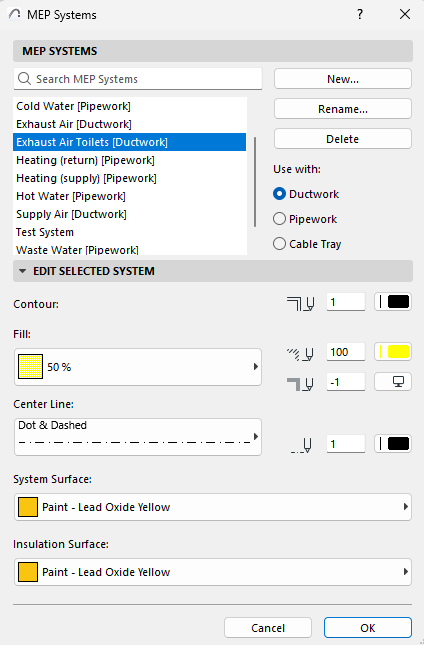
Use or edit the predefined MEP Systems, or create new ones.
Use with (route type)
Each MEP System can be used by one route type: Ductwork, Pipework, or Cable Tray.
For each MEP System, choose one of these categories.
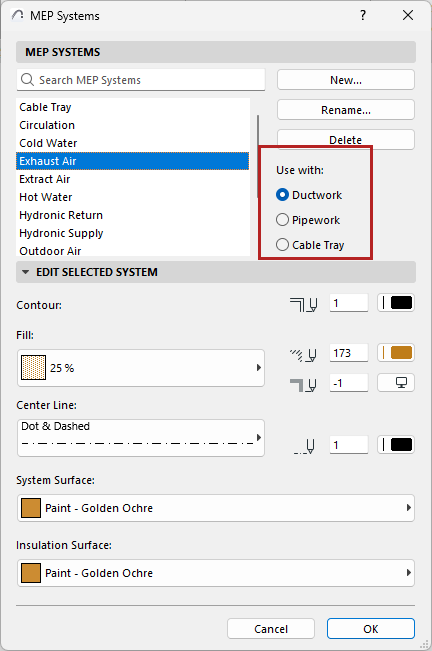
Use the controls to set fills, lines, and surfaces for the current MEP System.