Template Files
A template is a read-only project file with extension tpl. It contains all project preferences settings, placed elements and tool default settings of the project.
Built-in and online templates
When you create a new project using a template file, this default (built-in) template is at the top of the pop-up list when you choose a template. It is marked with a cogwheel icon.
Your version may also come with an “online” template (marked with a globe icon) which can be updated by your local partner.
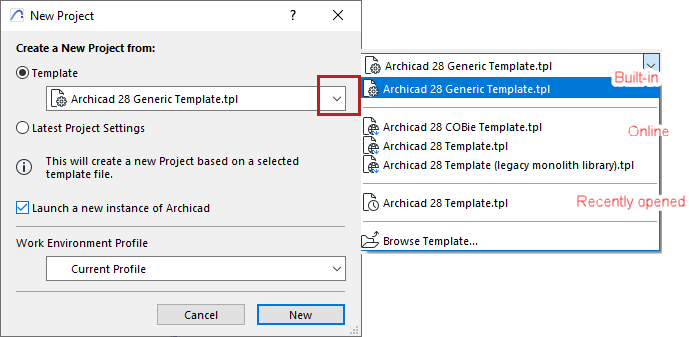
See also Create New Project.
Template File Location
The default (built-in) template is located in the application Defaults folder.
On PC: \Program Files\Graphisoft\ Archicad 30\Defaults\ Archicad
On Mac: \Applications\Graphisoft\ Archicad 30\Defaults\ Archicad
To create a customized template:
To open a template:
Do one of the following:
- Use File > Open, and browse for an existing template file
- Use File > New
- In the appearing New Project dialog, use Create New Project from Template
- Select the desired template file.Note: Template File selection also occurs when you import or hotlink an IFC-type file, because IFC Translator files are saved in a template.
For working with IFC Translators, see Important Note on Translators and Template Files