Labeling Electrical Panel
For Electrical Panels, the following Autotext parameters are available in the MEP category.
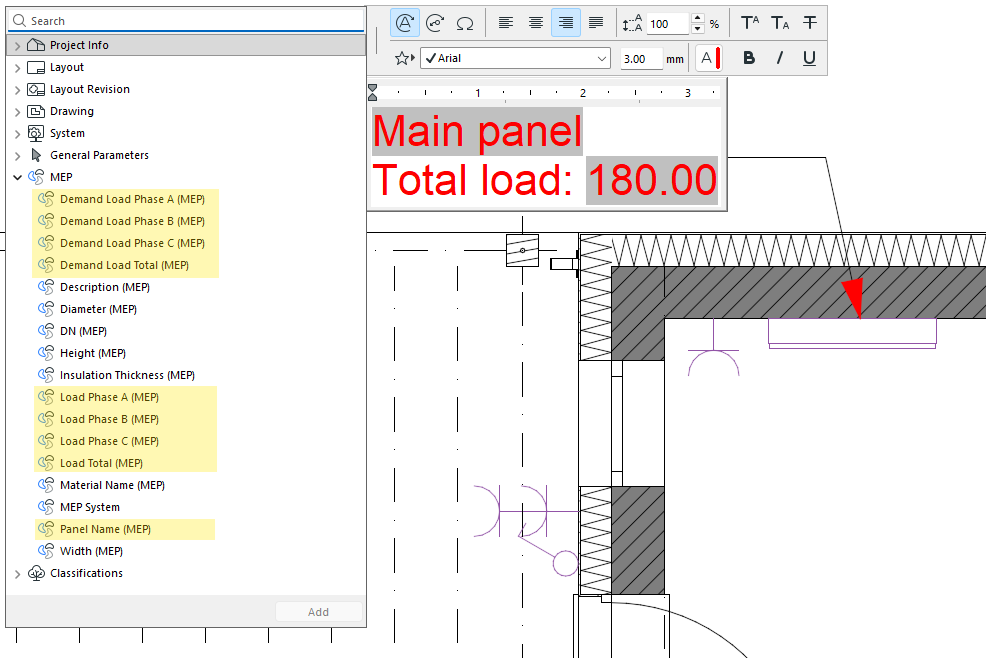
The Autotext parameters return the following values:
- Panel Name - The name of the Electrical Panel. In case of circuits, the name of the parent Panel.
- Load Phase A/B/C - The total electrical load of Phase A/B/C.
Example: An Electrical Device has an Apparent power of 15 VA, and it belongs to a circuit that uses only Phase A (circuits and their phases are defined in the settings dialog of an Electrical Panel element). All 15 VA will contribute to Load Phase A.
Note: If the Apparent power checkbox is unchecked for the device, or the
device is not part of any circuit (its Supply field is set to “Main”), the device will not
contribute anything to any Load Phase.
- Load Total - The sum of Load Phases A, B, and C.
- Demand Load Phase A/B/C - The total electrical demand load of Phase A/B/C. Calculation: The Apparent power an Electrical Device contributes to a Phase is multiplied by the Demand Factor value based on the Load Classification of the device.
Example: An Electrical Device contributes 15 VA to Load Phase A. Its Load Classification is set to “Lighting”, with a Demand Factor of 0.8 (as specified in Electrical Project Settings). The Demand Load the device contribute to Demand Load Phase A is 15 * 0.8 = 12 VA.
- Demand Load Total - The sum of Demand Load Phases A, B, and C.