Map SAF Cross Sections By Name
In the Profile Mapping - Import panel of the SAF Translator:
- From the Type pop-up, choose Profile.
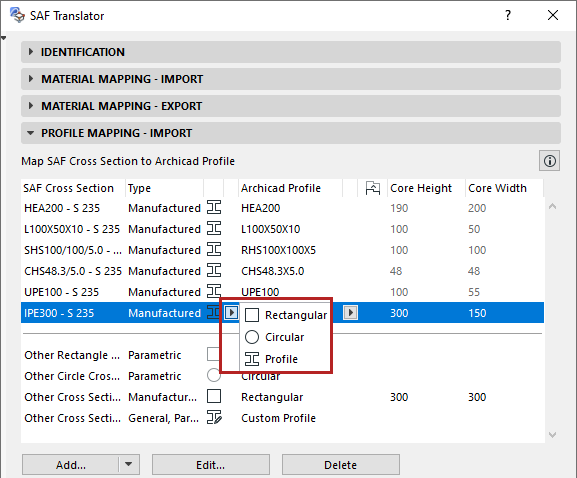
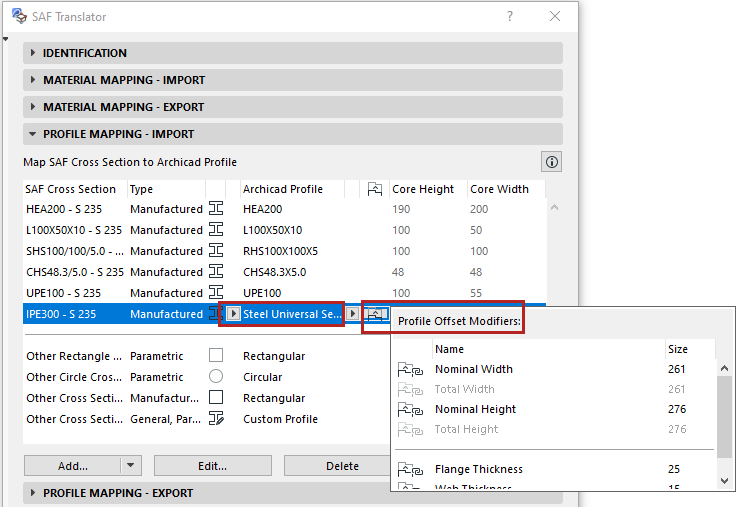
- From the Archicad Profile pop-up, choose a Profile from the current project. (Available Profile attributes: those with a core and used with Beams or Columns.)Note: You can use Options > Complex Profiles > Import Standard Steel Profile to add new Profile attributes to the project.
See also Use Standard Steel Column or Beam Profile .
- View and edit the Complex Profile’s Offset Modifiers as needed, to best match the incoming Cross Section.
To expand the list of mappable SAF Cross Sections: see Add More SAF Cross Sections (Import SAF) .
Automatic Mapping of Manufactured Cross Sections
For incoming, manufactured SAF profiles that are NOT mapped by name in the Profile Mapping list: You can activate automatic mapping based on a default database.