Add More SAF Cross Sections (Import SAF)
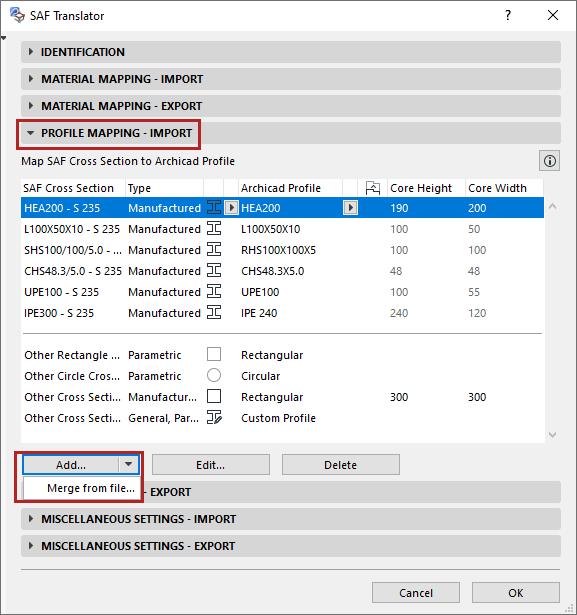
In the Profile Mapping - Import panel of the SAF Translator:
There are two ways to expand the list of mappable SAF Cross Sections:
Merge Cross Sections from SAF File
This is the preferred method, because you can avoid typing errors.
- From the Add button, click Merge from file.
- Browse for an .xlsx (SAF) file prepared for this purpose.
See Prepare and export a SAF Data File to ensure standard mapping.
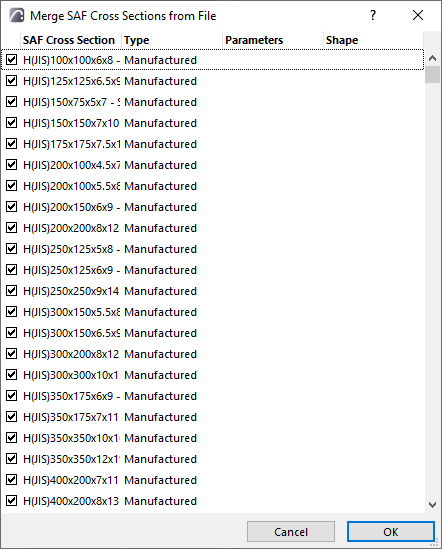
- Cross Sections from the SAF file appear in a dialog. Review this list and check the ones to import.
- Click OK.
Add or Edit SAF Cross Sections Manually
Priority of Mapping Rules for Manufactured Cross Sections
Mapping rules are applied in the following order:
- Mapping by name, based on the list in the Profile Mapping - Import panel
- External database (provided that the “Create Profiles for Unmapped Manufactured Cross Sections” box is checked).
- “Other Cross Sections - Manufactured” setting. This is the catch-all definition for all manufactured Cross Sections that have not been mapped in steps 1 and 2 above.