Add More SAF Cross Sections to Mapping List (Export to SAF)
In the Profile Mapping - Export panel of SAF Export Translator: There are two ways to expand the list of available SAF Cross Sections:
Import SAF Cross Sections from SAF File
This is the preferred method, because you can avoid typing errors.
- Click SAF Cross Sections.
- Click the Import button.
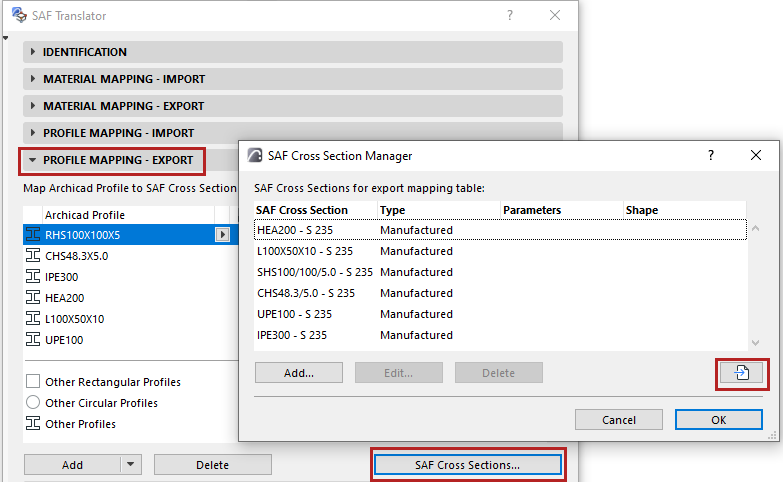
- Browse for an.xlsx (SAF) file prepared for this purpose.
See Prepare and export a SAF Data File to ensure standard mapping.
- The SAF Cross Sections from the .xlsx (SAF) file (Parametric, Manufactured and Compound types) are now listed in the dialog.
- Sort and select the listed Cross Sections as needed.
- Click OK to add them to the Translator.
Add or Edit SAF Cross Sections Manually
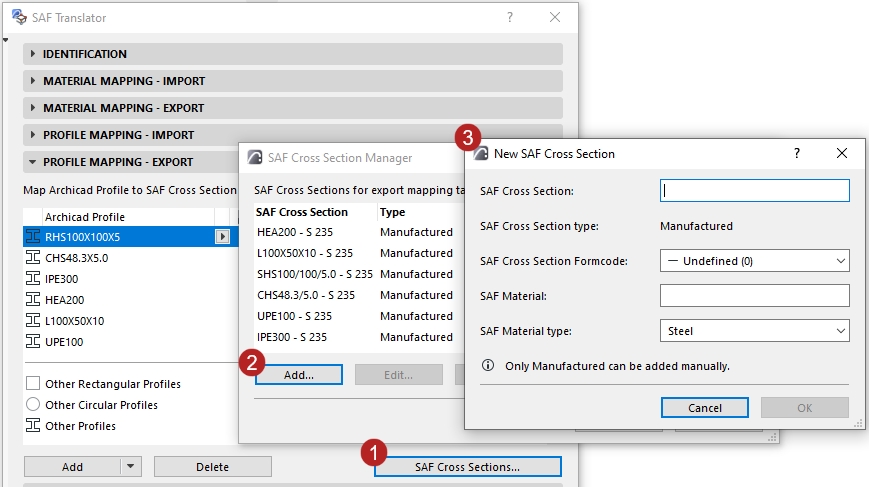
To edit data for any listed Cross Section, select it in the list and click Edit.