Text Content
In the Text Content panel: Choose how to display the elevation value.
This panel is available in
Single-value (Level Dimension)
Basic option to display the elevation of the element’s visible top.
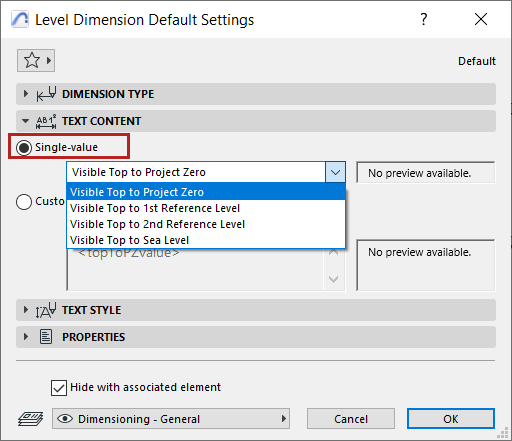
Choose a reference level from which to measure the element’s visible top:
Define reference levels at Options > Project Preferences > Reference Levels)
Custom Text Content
“Custom”gives you more options via Autotext to choose different measured levels and reference levels.
You can also add custom text and superscript, and format multi-line text.
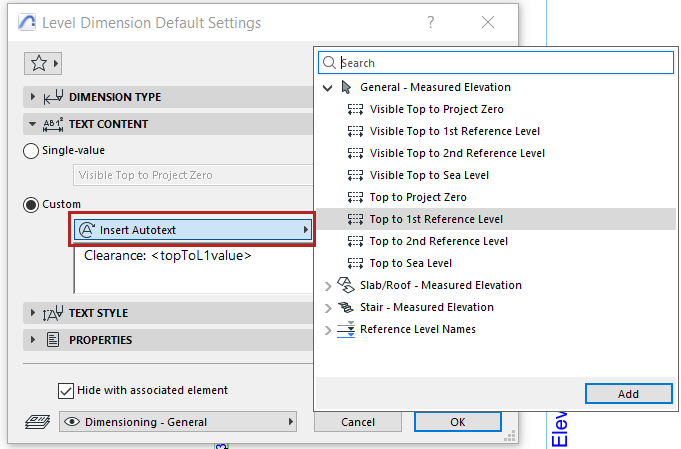
Insert Autotext (Level Dimension)
Click to choose a different elevation level (other than visible top) and reference level.
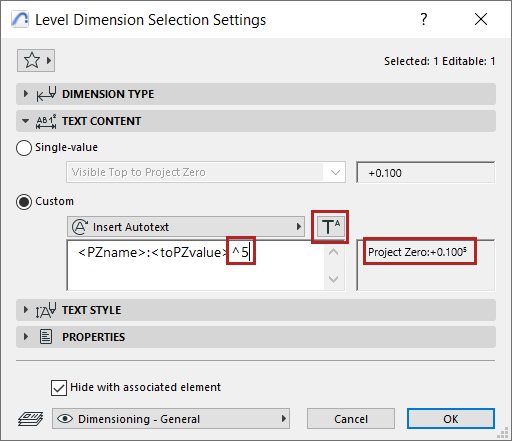
Add superscript to dimension text
Click Insert Superscript Symbol, then add your superscript text. (The symbol is shown in the dialog as a caret.)
To continue the text in regular font, click Insert Superscript again.
Set dimension unit at Options > Project Preferences > Dimensions).