BIMcloud 幫助
ShowTopicInContext
  1. Home >
  2. 安裝或重新配置 BIMcloud >
  3. 全新安裝 >
  4. 重新配置BIMcloud組件

重新配置BIMcloud組件

重新定義已安裝的 BIMcloud 組件

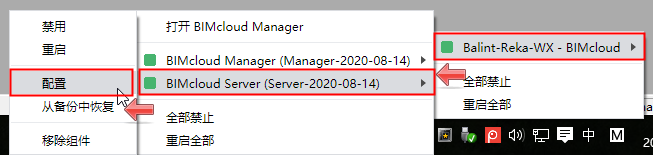
要重新配置BIMcloud 的某個組件:
  1. 找到BIMcloud托盤圖標
  2. 點擊進行分配
  3. 從備選選單中找到所需的組件
  4. 點擊 配置。


上層主題: 全新安裝
相關資訊
  • 配置BIMcloud Server
  • 配置BIMcloud Manager
  • MacOS:允許全盤訪問
  • 重新定義檔案存儲位置
  • 重新定義快照檔案夾
Copyright © 2025 by Graphisoft. All rights reserved. Graphisoft is part of the Nemetschek Group