Assign a Cover Fill
Cover fills can be applied to Beams, Columns, Slabs, Meshes, Roofs, Shells, Openings, Morphs and Zones.
For all of these element types except Zones:
- Go to the Floor Plan and Section panel of its Settings (or click Floor Plan and Section button in the Info Box.)
- Check the Cover Fills box.
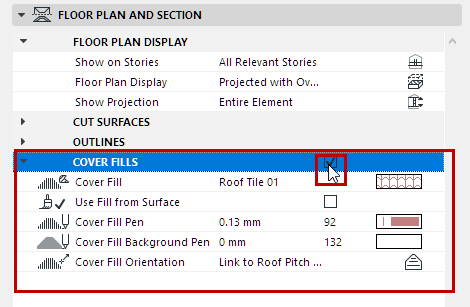
- Click the Cover Fill parameter pop-up to access the list of available fills, and choose the desired fill.
- Using the cover fill controls that follow:
For Zones:
- Activate the “Cover Fill” button in Zone Settings (Floor Plan panel) by
clicking it.
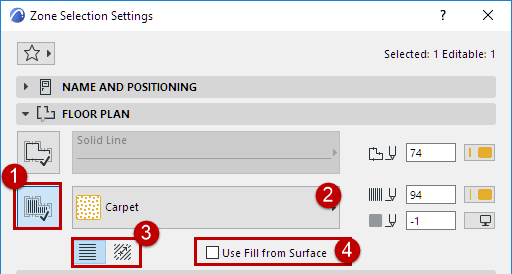
- Click the fill name or icon to access the list of available fills, and choose the desired fill from the pop-up list.
- Choose a radio button to define the orientation of the fill pattern.
- If the Zone’s surface has a Cover fill, you have the option to display that instead: Check Use Fill from Surface.