To help with data management, you can set up data cleanup reminders for data of a certain age.
- Go to Teamwork > Project > Local Data Manager.
- Click the Options button to open the Local Data Options dialog box.
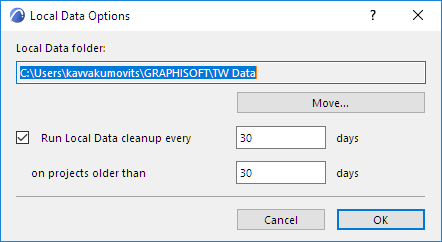
- Check the Run Local Data cleanup box.
- Enter the number of days - (for example 15). This means the program will check for old and unused data every 15 days.
- Enter the number of days (e.g. 15 days) beyond which a project is considered “old.”
- At the scheduled intervals, the program will suggest that you consider a cleanup of your local data, if old data is found.