Create a Mesh
New Meshes can be created in either the Floor Plan or the 3D Window.
See also Surveyors’ data (.xyz).
The Mesh has four geometry methods in the Info Box. You can create Polygonal, Rectangular and Rotated Rectangular shapes or a Regular Sloped Mesh.

In all cases, you will draw a Mesh polygon at the elevation of the Mesh reference plane defined in the Settings dialog box.
- The Polygonal and Rectangular/Rotated Rectangular Mesh geometry methods work the same as similar controls for the Slab tool.
- The Regular Sloped Mesh method
helps you quickly create regular Meshes with plane surfaces.
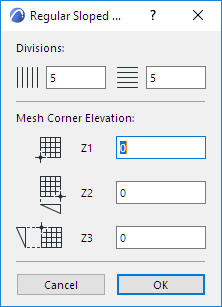
After defining the rectangle contour of the Mesh, the Regular Sloped Mesh dialog box opens automatically.
If needed, select the Mesh and edit its points, add new points, or create a hole.