Manual snapshots
Create a manual snapshot of a Teamwork project or library at any time
- In the Projects root, select the Teamwork project or library that needs a snapshot.
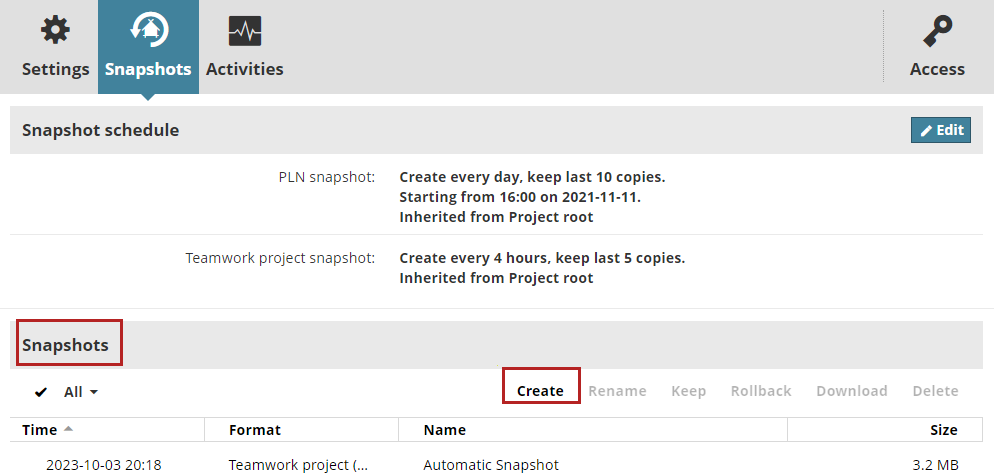
- In the Snapshots panel, at the Snapshots list section: Click Create.
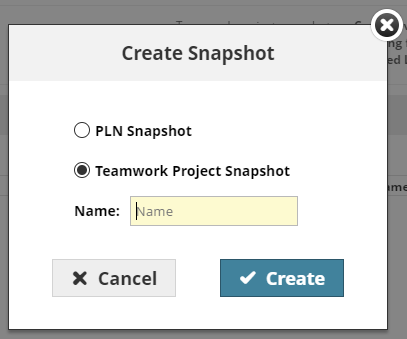
For a project: Choose the type of snapshot you want (PLN or Teamwork project), and give it a name.
For a library: Give the snapshot a name.
Note: The name value must meet these requirements:
- It cannot be empty
- It cannot contain any of these characters:
<>:;?"*|/\ - It cannot end with a period (
.) or a whitespace
A Teamwork project snapshot starts immediately as a background job, and you will receive a notification after it completes. The new snapshot is listed in the Snapshots list (as well as on the Activities panel).
For a PLN Project snapshot: See PLN Project Snapshots
If a snapshot of the chosen type is already in progress or pending, you cannot create another one until the first one is complete.