Component Data in Archicad
What Are Components?
Any construction element or Library part having a Building Material consists of one or more components.
- A simple Slab has one Building Material and one component.
- A composite Slab has as many components as it has skins: Each skin has a Building Material and each skin is a separate component (even if several skins happen to use the same Building Material).
- In a profile element: Each fill (as seen in Profile Editor) represents a separate component.
- GDL objects work differently. All parts of the object that use the same Building Material are considered a single component. For example, multiple object parts, which all use the same Glass Building Material, are considered as a single component.
Using Component Data in the BIM Model
Component Data can be shown in the following:
Component Lists
Component Lists are optimized to list information about each component of composite, profile or basic elements: walls, slabs, roofs, morphs, meshes, and/or multi-component profile elements.
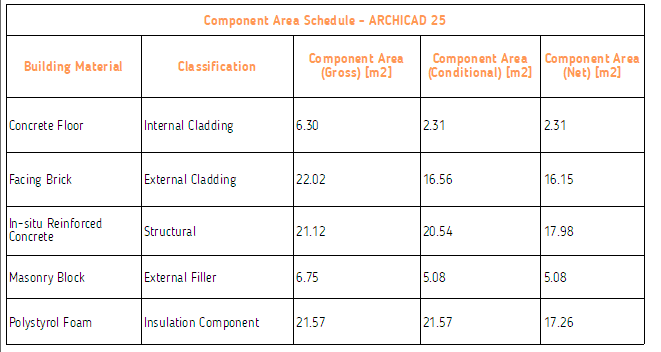
A component list can include:
- Properties that are specific to components (see Component Listing Parameters in the Interactive Schedule )
- Any of the Building Material properties (because each component consists of at most one Building Material)
- Naturally, you can add element properties to the list, but these property values will reflect the element-level data (not the component´s data)
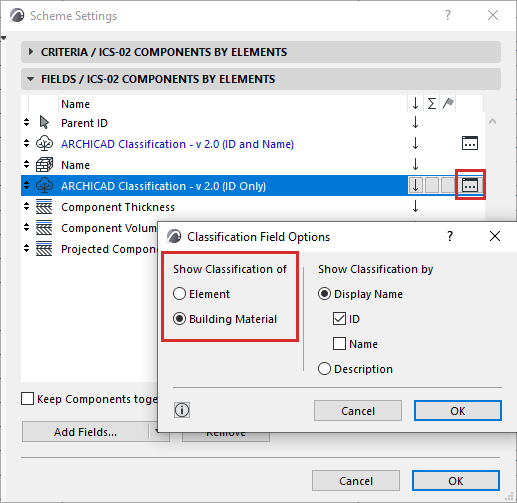
Show Classification Data in Component List
Components themselves do not have a classification.
If your Component Scheme includes the Classification parameter: Click the pop-up to specify which classification data to show: