The LightWorks Rendering Engine, built into the ArchiCAD PhotoRendering interface, gives you the power to create high-quality photorealistic images that can be published as ArchiCAD views. LightWorks offers ray-tracing, soft-shadow and reflection features and complex shader editing capabilities, yet its interface is compatible with ArchiCAD’s own elements.
For examples of LightWorks images, see Exterior LightWorks Example and Interior LightWorks Example.
Basic LightWorks functions include predefined shaders that you can use with their default settings. Expert options allow you to edit those shaders and to use special unique light objects that can greatly enhance renderings by simulating ambient lighting.
LightWorks introduces ray tracing to ArchiCAD. Ray tracing works by casting rays from the point being shaded towards each light source, thus establishing whether or not there is a direct line of sight from the point of the light source. By this it is possible to determine whether a surface point is lit or in shadow from a light source.
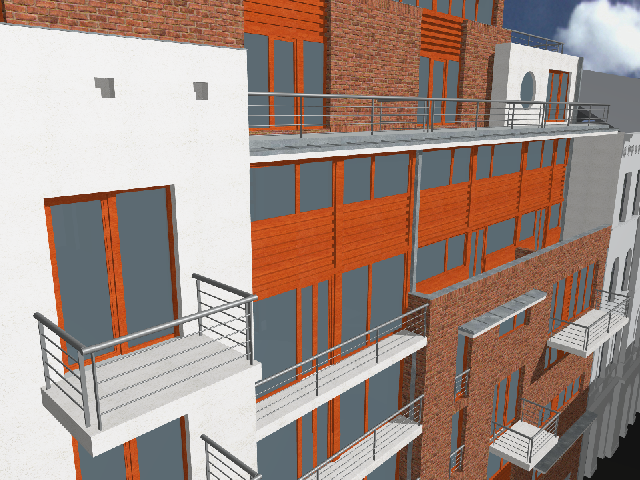
The simplest way to start working with LightWorks is to open an ArchiCAD Project and switch to the LightWorks Rendering Engine in the Document > Creative Imaging > PhotoRendering Settings dialog box. The LightWorks Engine will understand ArchiCAD surfaces and convert their Transparency, Emission, Reflection and Glowing values to its own format. The following picture was taken with the Internal Rendering Engine.
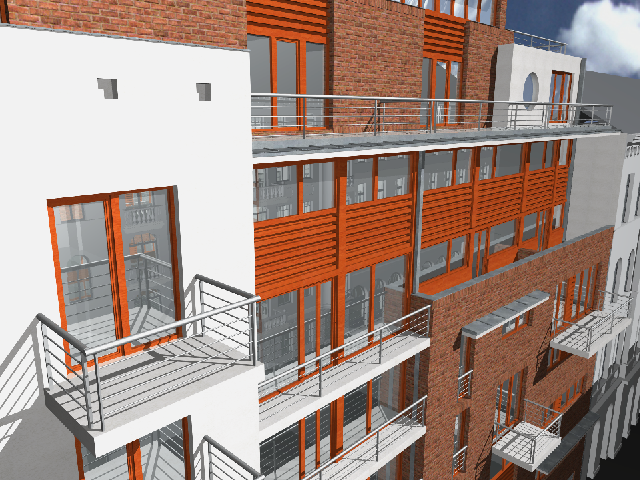
The same Project rendered with the LightWorks Rendering Engine appears below. Thanks to ray tracing, you can see reflective glass surfaces and nicer shadows in this rendering.
When working with LightWorks, the usual procedure after building the 3D model is to define surfaces, then load and modify shaders connected with these surfaces using the LightWorks Shader Settings panel in the Options > Element Attributes > Surfaces dialog box.
For more information, LightWorks Shader Settings.
There are archive files storing hundreds of predefined shaders. Most of the time you can find the shader you like among the predefined ones.
LightWorks shaders can have textures like the ones used with the ArchiCAD Internal Rendering Engine. Another feature is the use of so-called ‘procedural’ shaders in which patterns are defined by a set of parameters.
•Image-based shaders can easily exhibit tiling when patterns are repeated across a surface, lose their definition when viewed close up, and can use up large amounts of memory.
•LightWorks procedural shaders do not exhibit tiling, give a unique appearance at each point of the surface, are more memory efficient, and offer more flexibility because of their adjustable parameters.
Important notes for users of Projects created in ArchiCAD 8.1 or earlier: Although ArchiCAD surfaces all have Reflection values defined for them, rendering engines in earlier versions did not use these values. Since the LightWorks Rendering Engine understands and uses these values, this might lead to unexpected results if these values are not adjusted. So you might have a surface named Concrete that is very shiny with a lot of diffuse light around it. This can come from those Ambient, Diffuse and Shininess values. In such a case, adjust these values until they give a satisfactory result.
Also, ArchiCAD surfaces can have a texture assigned to them as well as a LightWorks shader (which is also, in effect, a texture). The ArchiCAD texture will be displayed in the 3D Window when OpenGL is being used as the 3D Engine, and in PhotoRendering when the ArchiCAD Internal Engine or the Z-Buffer Engine is being used. But if you use OpenGL in the 3D Window and LightWorks Rendering Engine in PhotoRendering, the textures might look completely different, which can be misleading. There are two solutions to this if you plan to create your PhotoRenderings with the LightWorks Rendering Engine. The first one is not to use the OpenGL engine in 3D so it will not mislead you as to how it will look like in PhotoRendering. The second is to remove ArchiCAD textures from any surfaces to which LightWorks shaders are assigned. Then these surfaces will not display any texture in 3D even with the OpenGL engine, and misleading preview images are thereby avoided.