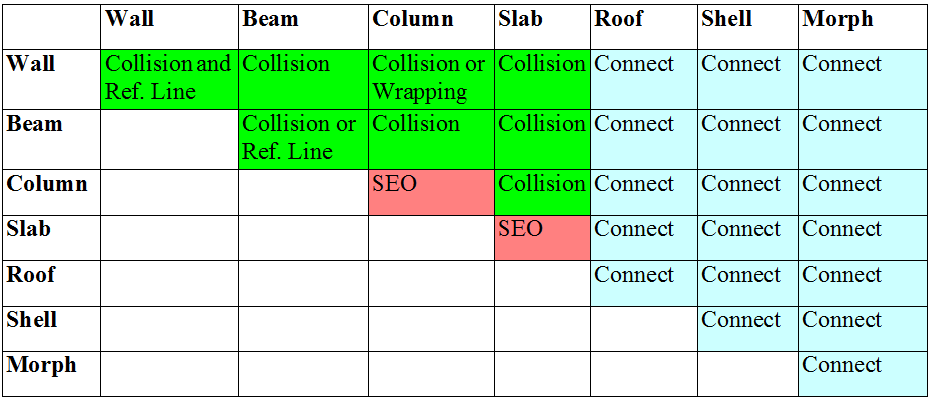
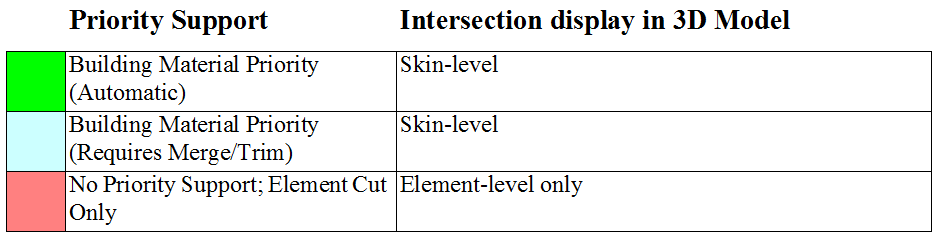
The basic principle of intersections (or junctions) is that the construction elements must collide in space. All construction elements will clean up correctly in all views, provided that they collide.
In the case of Shells, Morphs and Roofs, they must collide, and they must also be merged or trimmed via the commands of the Connect menu.
The resulting intersection depends on the elements’ Building Material priorities, set in the Building Materials dialog box. The element (or skin) with the higher-priority Building Material will cut the one of a lower priority.
This works for the following elements: Wall, Beam, Column, Slab, Roof, Shell, Morph – whether basic, complex profile, or composite. (All these elements use at least one Building Material.)
Automatic Intersections
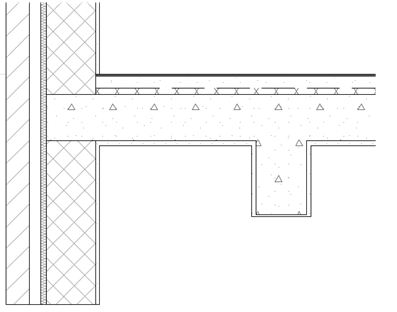
Intersections are model-based: The connections physically modify the geometry down to the skin level. This means that they will be correct in all model views, including the 3D window and in lists or schedules, as well as on Floor Plan and Section
Note: Intersections that include elements in symbolic display in Floor Plan may not match the 3D model representation; elements whose display is based on their 3D projection will be correct.
Layer Intersection Groups provide an additional means of control: Elements whose layers have differing intersection numbers never intersect.
Note: Layer Intersection numbers have nothing to do with element priorities; they serve merely as tags or labels (e.g. 1 or 2) for grouping elements.