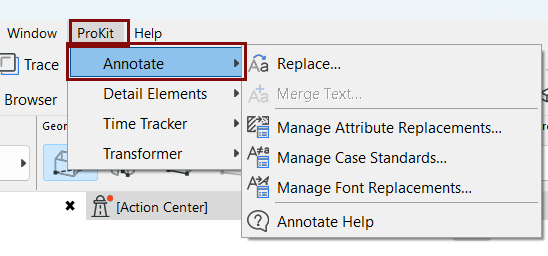
Annotate
Use Annotate to batch-replace annotation attributes and text formatting across a project. Instead of editing elements one at a time, you define replacement rules once and apply them to the current view, a selection, a whole plan, or the entire project.
Annotate is intended for standards cleanup: bringing a project in line with an office template, or normalizing files and drawings that originated outside Archicad.
What you can change
- Attributes: Fills, pens, and line types, optionally including attributes used by library parts
- Text fonts: Individual fonts, or whole font families at once
- Text case: A single case standard applied to the project's text strings, with defined "case exceptions" as needed (such as units, abbreviations, and proper nouns)
Workflow
- Define your rules in the relevant manager: Attribute Replacement Manager, Font Replacement Manager, or Case Exception Manager. Rules are stored with the project, and can be exported and reused in other projects.
- In the Annotation Replacement dialog, choose which kinds of replacement to run and which part of the project to apply them to.
- Click Replace.
Because a replacement can affect large parts of a project at once, run it on the current view or a selection first, verify the result, then widen the scope.
Annotate commands
Use the ProKit > Annotate menu: