BIMcloud Help
Click here to see this page in full context
  1. Home >
  2. Install or reconfigure BIMcloud >
  3. Clean Installation >
  4. Reconfigure BIMcloud components

Reconfigure BIMcloud components

Redefine a BIMcloud component that you already installed

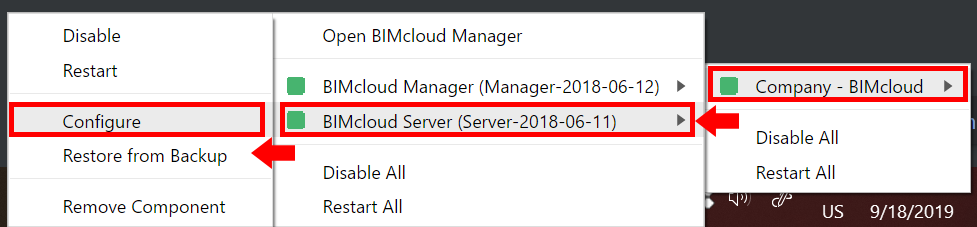
To re-configure a BIMcloud component:
  1. Locate the BIMcloud tray icon
  2. Click to open it
  3. Find the component you need from the available contextual commands
  4. Click Configure


Parent topic: Clean Installation
Related information
  • Configure BIMcloud Server
  • Configure BIMcloud Manager
  • MacOS: Enable Full Disk Access
  • Redefine file storage location
  • Redefine Snapshot folder
Copyright © 2025 by Graphisoft. All rights reserved. Graphisoft is part of the Nemetschek Group